ads.txt Generator
Create ads.txt lines from your seller details, or paste your current file and merge new rows into it.

What you get
- One line per seller Ad system domain, seller ID, DIRECT or RESELLER, and an optional certification ID, in the IAB format.
- Merged with your file Existing lines and comments stay as they are; an exact duplicate is skipped and new sellers go at the end.
- Conflicts wait for you A row for a seller and account already in your file that differs in any way, such as the relationship or the certification ID, changes only after you confirm it.
How the generator works
You enter one seller row, add the file you already have if there is one, and get back the full text of ads.txt to copy or download.
-
Describe one seller
Enter the advertising system domain, your seller account ID and the relationship. Add a certification authority ID if the partner gave you one.
-
Paste your current file
Optional. Open example.com/ads.txt in a browser, copy the text and paste it into the merge box. Leave the box empty to start a new file.
-
Preview the draft
Your lines stay as they are, an exact duplicate is skipped and the new line goes at the end. A clash with an existing line waits for your confirmation.
-
Copy or download
Copy the text, or download it as a file named ads.txt. You upload it to your domain root yourself.
- Fields in a seller line
- 4
- New seller row per preview
- 1
- Largest file you can paste
- 256KiB
- Lines in one draft
- 5,000
What goes into the draft
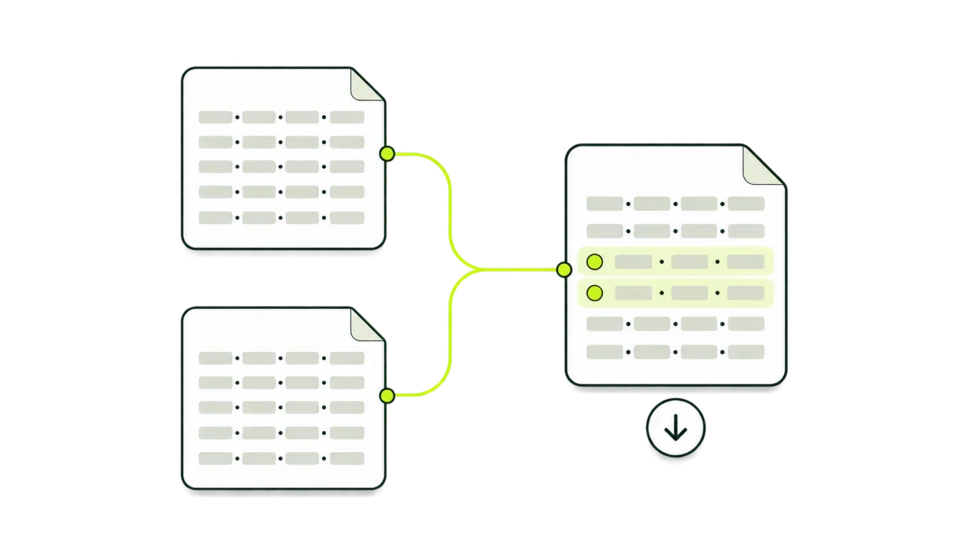
The draft is the complete text of an ads.txt file. This authorized digital sellers generator writes one line per seller in the IAB format and leaves everything you pasted as it was.
-
One line per seller
Each preview adds one seller line: domain, account ID, relationship and the optional certification ID, joined by a comma and a space.
google.com, pub-XXXXXXXXXXXXXXXX, DIRECT, f08c47fec0942fa0 -
Your values as typed
The account ID and the certification ID are written exactly as you entered them. The system domain is lowercased and the relationship is set in capitals.
example.org, AbC-123, RESELLER -
Existing lines untouched
Comments, blank lines, variables and every seller line in the pasted file keep their place and their wording.
OWNERDOMAIN=example.com -
Duplicates skipped
A new line that matches an existing one, ignoring letter case, is not added a second time. The New records readout then shows 0.
-
Conflicts held back
When your file already has a different line for the same system and account ID, the draft stays unchanged until you tick the replacement.
RESELLER → DIRECT -
The draft carries forward
After each preview the merge box holds the whole draft, so the next seller you enter is added to it. Windows line endings (CRLF) in a pasted file are kept.
Anatomy of an ads.txt line
ads.txt is plain text. Seller lines have three or four comma-separated fields, and comments and variables can sit around them.
-
Comment
Everything after # is ignored by the systems that read the file. Comments in a pasted file stay where they are.
-
Variables
NAME=value lines say who owns or manages the inventory. MANAGERDOMAIN may carry a two-letter country code after a comma. The generator keeps these lines as written and does not add new ones.
-
Advertising system domain
The domain of the system that sells the ads, such as google.com. The form accepts a bare domain only: no https://, path or IP address.
-
Seller account ID
Your account inside that system. For AdSense it is your publisher ID in the pub- form. Other systems use their own formats, so any ID without spaces, commas or line breaks is accepted.
-
Relationship
DIRECT when you control the account, RESELLER when another company does. The generator writes it in capitals.
-
Certification authority ID
An optional ID that the ad system publishes for itself. The one for google.com is f08c47fec0942fa0.
-
Line without the fourth field
Three fields are a complete line. Leave the certification field blank and the generator writes three.
Reading the draft preview
After Preview draft, the panel beside the form shows the file as it would be saved, two readouts and the copy action.
-
Status
Always reads Not published. Nothing on this page writes to your server, so your live file stays as it is until you upload a new one.
-
New records
How many seller lines this preview added. 0 means the line was already there, or you previewed a pasted file on its own.
-
Conflict notice
Shown only when a new line clashes with one of yours. Until you confirm, the text stays as it was and cannot be copied or downloaded. The form lists each clash as old line → new line.
-
Draft text
The whole file: your pasted lines first, in their original order, then the new line. Copy and Download both produce exactly this text.
-
Copy draft
Copies the text to the clipboard. When the browser blocks that, the text is selected so you can copy it with your device's Copy command.
-
Next
The last step happens outside PubMonitor: upload the file to your domain root and open it in a browser to confirm it loads as plain text.
Draft states and messages
The preview panel and the form use these words. Each one points to a different fix.
Where each line comes from
Every line should come from the company that issued the account. The ads.txt Generator lays the line out; the values are yours to supply.
- AdSenseDIRECT
- Your line names google.com, your own publisher ID in the pub- form, DIRECT and the certification ID f08c47fec0942fa0. Your ad code shows the same number with a ca- prefix, which ads.txt leaves out.
- Other ad networks and exchangesFrom the partner
- The partner's setup pages or onboarding email give its system domain, your account ID, the relationship and its certification ID if it has one.
- Resellers and managed partnersLines they send
- A company that sells your inventory through its own accounts sends you a set of lines. The accounts it controls are marked RESELLER.
- sellers.jsonCross-check
- Ad systems publish sellers.json files that list their seller accounts. The sellers.json Checker shows how a dated snapshot of Google's file lists a seller ID.
A line copied from another site's file names that publisher's account. Listing it in your file authorizes that account to sell ads on your domain.

Choosing DIRECT or RESELLER
The relationship says who controls the account in the second field. The form leaves it blank until you choose.
- DIRECT
- You control the account named in the second field. Your own AdSense account is the usual example.
- RESELLER
- Another company controls the account and may sell your inventory through it.
- Both in one file
- Files often mix the two. One ad system can appear on several lines, each with a different account ID and its own relationship.
- No default
- The form preselects neither value. A row without a choice stops with Relationship is required, so a guess never reaches the file.
- Letter case
- Readers of the file treat direct and DIRECT alike. The generator writes capitals, and a lowercase line in your pasted file counts as the same line.
What to enter
Three fields are required for a new row. The certification ID and the pasted file are optional.
Accepted
google.comAn advertising system domain, as the ad system lists it.
pub-XXXXXXXXXXXXXXXXAn AdSense publisher ID. IDs from other systems are accepted in their own format.
f08c47fec0942fa0A certification authority ID, or nothing at all.
Your current ads.txtPasted text up to 256 KiB and 5,000 lines, with comments and variables.
Changed in the draft
-
Google.COMbecomesgoogle.comThe system domain is lowercased. Spaces around every value are trimmed.
-
google.com | pub-XXXXXXXXXXXXXXXX | DIRECTbecomesgoogle.com, pub-XXXXXXXXXXXXXXXX, DIRECTThe fields are joined with a comma and a space. A blank certification field leaves three fields.
Not accepted
https://google.com/adsA URL or a path in the system field.
192.0.2.10An IP address in the system field.
pub-XXXX XXXXA space, a comma or a line break inside the account ID.
f08c47fec0942fa0 #mainA space, a comma or # inside the certification ID.
Example drafts
Four everyday jobs, each with placeholder values.
A new file with one AdSense line
google.com · pub-XXXXXXXXXXXXXXXX · DIRECT · f08c47fec0942fa0
- You see
- Draft preview with one line: google.com, pub-XXXXXXXXXXXXXXXX, DIRECT, f08c47fec0942fa0. New records: 1. Status: Not published.
- What it means
- The file lists your own AdSense account as a direct seller for the site.
- Next
- Download ads.txt and upload it so it opens at example.com/ads.txt.
A partner added to an existing file
example.org · 12345 · RESELLER
- You see
- Your pasted file, unchanged, with example.org, 12345, RESELLER as the last line. New records: 1.
- What it means
- Nothing in your file moved or changed. The partner line was appended.
- Next
- Copy the draft and replace the file on your server with it.
Same account, new relationship
example.org · 12345 · DIRECT
- You see
- Conflicts need confirmation before the text changes or downloads. The form shows example.org, 12345, RESELLER → example.org, 12345, DIRECT.
- What it means
- Your file lists that account as RESELLER. The draft keeps the old line until you decide.
- Next
- Tick the replacement and preview again. The new line takes the old line's place.
A line that is already there
google.com · pub-XXXXXXXXXXXXXXXX · DIRECT
- You see
- New records: 0. Your line google.com, pub-XXXXXXXXXXXXXXXX, direct stays exactly as it was.
- What it means
- The two lines match once letter case is ignored, so nothing was added.
- Next
- This seller is covered. Enter the next one.
Before and after you upload
The generator stops at the text. These checks finish the job on your server.
-
Every account ID came from its partner
Compare each ID with the partner's dashboard. A typo authorizes an account that is not yours.
-
AdSense IDs use the pub- form
Your ad code shows ca-pub-. In ads.txt the same number starts with pub-. The generator writes the ID exactly as you typed it.
-
The file is named ads.txt
Download saves it under that name. Ad systems request exactly /ads.txt, so keep the name when you upload.
-
It sits at the domain root
Upload it so it opens at example.com/ads.txt. A copy in a subfolder is not where ad systems look.
-
It loads as plain text
Open the address in a browser. You should see the lines as text, with no login page or HTML error page in the way.
-
You kept a copy
PubMonitor keeps no drafts. Save each version yourself, or use a custom ads.txt manager if you want a history.
-
Crawlers get time to catch up
Ad systems re-crawl the file on their own schedule. Allow a day or more before you expect a change to show.

Questions the generator leaves to other tools
The generator only formats what you give it. These questions need a live file, an account or another data source.
ads.txt Generator and related tools
Four tools deal with seller IDs. Pick the one that matches your question.
| ads.txt Generator This tool | Publisher ID Finder | sellers.json Checker | AdSense Checker | |
|---|---|---|---|---|
| Answers | What your ads.txt file should say | Which pub- IDs a page or pasted text carries | How a seller ID is listed in Google’s sellers.json | Which AdSense publisher IDs a homepage carries |
| You enter | Seller rows, and your current file if you have one | A domain, or pasted HTML or ads.txt text | A seller ID | A domain |
| It reads | Only what you type or paste | The live homepage, or your text | A stored, dated snapshot | The live homepage, with fallback records |
| Result | Plain text to copy or download | ID candidates with the text around them | Seller type, name and domain | IDs with source, date and index match |
Who drafts ads.txt here
An ads.txt creator earns its place whenever a line has to be written or changed by hand.
-
New site owners
Create ads.txt with the first AdSense line so the file is in place when ads go live.
-
Publishers adding a partner
Paste the current file, add the partner's lines one at a time and upload one finished file.
-
Ad operations teams
Use it as an ads.txt builder for partner changes, with every clash shown before it lands.
-
Developers and agencies
Assemble a client's file from the lines its partners sent, then hand over the download.
Terms used on this page
The words on the form and in the draft, in the order they come up.
- ads.txt
- A plain-text file at a site's root that lists the accounts allowed to sell its ad inventory. The name stands for Authorized Digital Sellers.
- Advertising system domain
- The domain of the ad system that holds the seller account, such as google.com.
- Seller account ID
- The account number inside that ad system. Partners also call it a publisher ID or an account ID.
- DIRECT
- The publisher controls the account in the line.
- RESELLER
- Another company controls the account and may sell the inventory through it.
- Certification authority ID
- An optional ID for the ad system itself. The one for google.com is f08c47fec0942fa0.
- Variable
- A NAME=value line. The names readers recognize are OWNERDOMAIN, MANAGERDOMAIN, CONTACT, SUBDOMAIN and INVENTORYPARTNERDOMAIN.
- Conflict
- A new line for a system and account ID that your file already lists with different text.
- Merge box
- The text area that holds your current file. After a preview it holds the whole draft.
Common questions
Does downloading update my site?
No. Download saves a file named ads.txt on your device. Your site changes only when you upload that file to the domain root yourself.
Can the generator read my live ads.txt?
It fetches nothing. Open example.com/ads.txt in a browser, copy the text and paste it into the merge box, then add new rows on top of it.
Is my file stored?
Your text is sent to PubMonitor to build the preview or the download, and no copy is kept. Save your own versions, or use a custom ads.txt manager if you need a history.
Why is there a conflict when the lines look the same?
Lines are compared whole. Extra spaces, a trailing comment or a different certification ID make two lines for the same account differ. Letter case alone does not.
Can I add several sellers at once?
The form takes one seller per preview, and the merge box then holds the whole draft, so you add the next one on top. Lines you paste into the merge box yourself are kept as typed and are not checked.
Should my AdSense line be DIRECT?
Yes, when the AdSense account is yours. The line is google.com, your pub- ID, DIRECT and f08c47fec0942fa0. RESELLER is for an account another company controls.
What happens to comments and variables in my file?
They stay in place. When the generator looks for duplicates and conflicts it reads only lines with three or more comma-separated fields, and it never writes new variables.
Does it check that an account ID is real?
It checks the format only. Compare every ID with your partner's dashboard, or look a seller ID up in the sellers.json Checker.
Are Windows line endings kept?
Yes. When the pasted file uses CRLF line endings, the draft keeps them and the new line uses the same ending.
Is there a limit on use?
The merge box takes up to 256 KiB and 5,000 lines, and the finished draft has to fit the same limits. There is no sign-in and no daily cap, only a rate of 60 previews or downloads a minute, so you can generate ads.txt file text each time a partner sends new lines.
Draft the next line
Enter a seller row in the form above, or paste your current file first to build on it.